Prologue
It feels so pedantic to write “prologue”, I wonder if it’s having any effect on the user. I’ll still continue to write it for this entry, which is a symptom of my not-giving-a-fuck-itis flaring up again. I honestly didn’t know if I would have an update with progress today, but I ended up writing a physics system that was inspired by the render system. For this update I had to keep in mind I didn’t need a scientifically / mathematically truthful physics system, and what matters most is what the player sees. I am also very aware this game could have been made in 30 minutes with AI (again, not the point of this project, I do have other projects where this is my main focus).
Also note: It is thanksgiving - happy thanksgiving! We are celebrating 1 day later because weather caused travel issues for others to make it. So naturally I used that time to add collision to my linux terminal arcade game!
“Physics”
I use quotation marks here because I cheated a bit and everything is mostly a constant velocity. To start, I made it so the player falls down until they hit the bottom of the game screen, which I used as an opportunity to implement a Jump(). I scrapped a lot of this code as soon as I went into a more scaleable solution - PhysicsBuffer. My very first artisanal double pointer that was my idea - not taken from a reference implementation or AI.
main.cpp L519–527 Player::Jump: only from the ground, a small hop up and a -16 burst of velocity
void Jump() { if(bIsGrounded) { bIsGrounded = false; PositionY -=2; VelocityY = -16; } }
view on GitHub →
main.cpp L558–604 Player::FixedUpdate: the jump slows down, then falls at a constant 4
virtual void FixedUpdate() override { if(VelocityY < 0) { VelocityY += 1; } if(!bIsGrounded) { if(VelocityY < 0) { VelocityY += 1; } else { VelocityY = 4; // TODO: remove Default hardcoded fall speed } } else { VelocityY = 0; } if(InputX != 0) { VelocityX = InputX * Speed; } if(InputY != 0) { if(InputY == -1 && !bIsGrounded) { VelocityY = 10; } } if(bIsGrounded) { VelocityY = 0; } PositionX += VelocityX; PositionY += VelocityY; }
view on GitHub →
Similar to the rendering system, PhysicsBuffer allocates a 320 * 240 elements that are of type Entity*, meaning we allocate 320 * 240 * 8 bytes 30 times a second, which means it costs 2.2MB/s, this is pretty cheap for a 512MB/s system, I noticed 0 performance impact on the game when applying this to all Entity’s in the base class. This took some iteration because I had the buffer indexing wrong (I was previously doing ScreenHeight * Y + X, our rendering indexes using ScreenWidth * Y + X).
main.cpp L850–865 Game::Physics: one Entity* per pixel, allocated and freed every fixed frame
void Physics() { Entity** PhysicsBuffer = new Entity*[GameHeight * GameWidth](); for(const auto& CurEntity : Entities) { CurEntity->StartPhysics(PhysicsBuffer); } for(const auto& CurEntity : Entities) { CurEntity->CheckPhysics(PhysicsBuffer); } delete[] PhysicsBuffer; }
view on GitHub →
main.cpp L727–733 Physics() runs between FixedUpdate() and Render()
auto Now = chrono::steady_clock::now(); if(Now - LastFixedFrame >= (1000ms / FixedFPS)) { FixedUpdate(); Physics(); Render(); }
view on GitHub →
main.cpp L273–297 Position, size and velocity moved into the Entity base class
Entity(int SpawnPosX, int SpawnPosY): PositionX(SpawnPosX), PositionY(SpawnPosY){} Entity(int SpawnPosX, int SpawnPosY, int _SizeX, int _SizeY): PositionX(SpawnPosX), PositionY(SpawnPosY), SizeX(_SizeX), SizeY(_SizeY){} virtual ~Entity(){} const bool& IsAlive() { return bIsAlive;} void Kill() { bIsAlive = false; } const int& GetPositionY(){ return PositionY; }protected: int SizeY; int SizeX; int PositionX; int PositionY; int VelocityX = 0; int VelocityY = 0; int Weight = 1;
view on GitHub →
The way it works: I allocate the PhysicsBuffer array, call a StartPhysics(Entity** PhysicsBuffer) method on each Entity that sets indexes of the buffer to the address of the Entity that occupies that index. Then I call a CheckPhysics(Entity** PhysicsBuffer), which is a virtual override for individual Entity’s to define bespoke behavior for. So far this has been used only on the player to introduce collision for platforms. (Disclaimer: I don’t know if this is a common physics design, it works for my game, I will mention some challenges in the next section but I am not yet aware of future challenges to come).
main.cpp L302–320 StartPhysics writes this into every pixel the Entity covers (Width * Y + X), CheckPhysics is the hook
virtual void StartPhysics(Entity** PhysicsBuffer) { if(IsInBounds()) for(int Y = PositionY; Y < PositionY + SizeY; Y++) { for(int X = PositionX; X < PositionX + SizeX; X++) { PhysicsBuffer[GameWidth * Y + X] = this; } } } bool IsInBounds() { return PositionX >= 0 && PositionX + SizeX <= GameWidth && PositionY >= 0 && PositionY + SizeY <= GameHeight; } virtual void CheckPhysics(Entity** PhysicsBuffer){}
view on GitHub →
Collision
Now for the easier part, collision! Big theme of this should be “seeing is believing”. When I first added collision detecting, I was checking if the floor exists 1 pixel below the player. This is when the fall speed was greater than the size of the platform, meaning if the player moves >8 pixels a second, they could clip through the ground. I ended up using debug draw lines to figure this out (which is when you render the same areas you’re checking for collision). This inspired me to add some padding to floor checks, and roof checks. I also made it so if the player detects the floor when they’re halfway into the floor, the player just moves to the top of the floor. This helped me define the rules for the roof as well, which felt super smooth!
main.cpp L608–622 Debug draw: paint the exact floor and roof check areas red
virtual void Render() override { DrawRectangle(PositionX, PositionY, SizeX, SizeY, Color); int LowerBottomY = PositionY + SizeY + 1; // Debug physics for(int BottomY = PositionY + SizeY - 2; BottomY < LowerBottomY; BottomY++) for(int BottomX = PositionX; BottomX < PositionX + SizeX; BottomX++) { DrawPixel(BottomX, BottomY, RED); } for(int TopY = PositionY - 1; TopY < PositionY + 4; TopY++) for(int TopX = PositionX; TopX < PositionX + SizeX; TopX++) DrawPixel(TopX, TopY, RED); }
view on GitHub →
main.cpp L626–648 Floor check: a padded strip at the feet, snap to the top of the Wall
virtual void CheckPhysics(Entity** PhysicsBuffer) override { int LowerBottomY = PositionY + SizeY + 1; bool CollisionDetected=false; // Touching floor if(IsInBounds()) //TODO: Add clamping instead of this for(int BottomY = PositionY + SizeY - 2; BottomY < LowerBottomY; BottomY++) for(int BottomX = PositionX; BottomX < PositionX + SizeX; BottomX++) { int Index = BottomY * GameWidth + BottomX; if(PhysicsBuffer[Index] != nullptr) { if(Wall* CollWall = dynamic_cast<Wall*>(PhysicsBuffer[Index])) { CollisionDetected = true; PositionY = CollWall->GetPositionY() - SizeY; } } } bIsGrounded = CollisionDetected;
view on GitHub →
Now that I have these rules in place, I had to make sure the player is able to land comfortably on platforms even with our new roof / floor detection system, and actually, this made it very smooth. The player now has some wiggle room for how high they have to jump to end up on the platform, making it feel like the edges of the platform are round. This also applies to if the player doesn’t jump high enough, it makes it feel like the player “bonks” their head and it slightly pushes them down.
main.cpp L650–669 Roof check: the "bonk" pushes the player below the Wall and kills upward velocity
// Touching roof CollisionDetected = false; if(IsInBounds()) for(int TopY = PositionY - 1; TopY < PositionY + 4; TopY++) for(int TopX = PositionX; TopX < PositionX + SizeX; TopX++) { int Index = TopY * GameWidth + TopX; if(PhysicsBuffer[Index] != nullptr) { if(Wall* CollWall = dynamic_cast<Wall*>(PhysicsBuffer[Index])) { CollisionDetected = true; PositionY = CollWall->GetPositionY() + 8; VelocityY = 0; } } } bIsTouchingRoof = CollisionDetected;
view on GitHub →
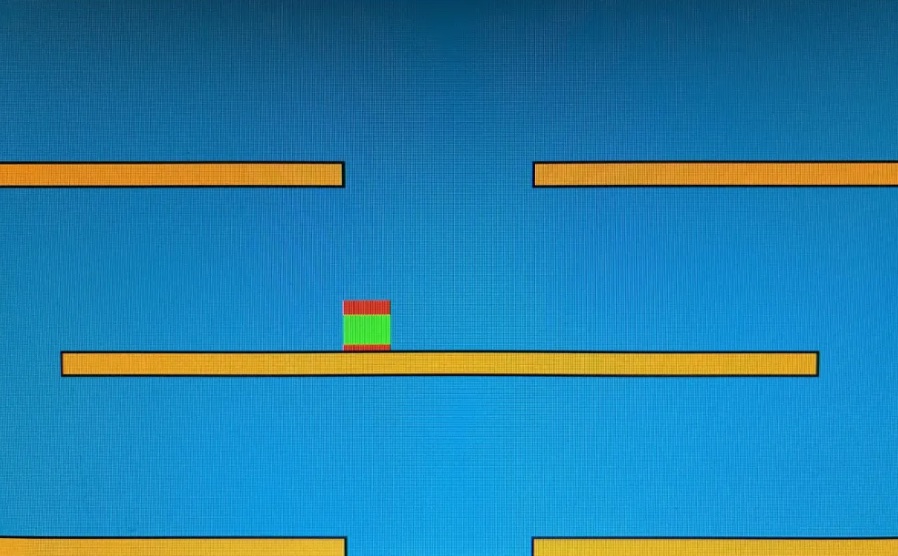
Anyway, here’s a picture of the player with the debug drawing of areas collision is being detected. We now have >1000 lines of code in a 23.7KB size file that was purely artistically hand written! Excited for the next update which will include tokens, enemies, and projectile collision!
Prologue
Disclaimer: this is not a formal blog, almost 100% of the content was not reviewed, I’m just typing shit. Compile time on a Pi Zero 2 w is pretty dang high, and I am starting to memorize which page using Ctrl + F / B each part of the codebase is on. This was probably the more fun day because I didn’t have to introduce using new Linux kernel API. Today I implemented a level layout as well as projectile system which I will take about NOW (I am tired because I actually exercised so this may be the least coherent entry of this blog).
Player Movement
Adding player movement was more like adding player rendering, since we already had a X/Y position we were tracking for the player. The major decision I had to make here is “how should I render 320 x 240 pixels on a limited resource hardware”, which I decided I will draw the screen once every frame, 30 FPS. Seems reasonable to do, if each pixel is a 2 byte Color16, at 30 FPS where we’re constantly allocating and deleting 320 x 240 pixels, we can suspect about 2 * 30 * 320 * 240 bytes per second is how much RAM is being used (~500kb/s). Using the X/Y positions that we already have on the player, I hard-coded a default size, and noticed there was some hitching going on (including 2 second delays of letting go of the input and the player was still visually moving).
main.cpp L672–718 Game::Render: allocate, clear, draw every entity, write, delete (every frame)
void Render() { uint8_t* BackBuffer = new uint8_t[PageSize](); //Draw Background Clear(CLEAR_COLOR); for(auto& CurEntity : Entities) { CurEntity->Render(); } for(int GY = 0; GY < GameHeight; GY++) { for(int SY = 0; SY < PixelScale; SY++) { int DestRow = GY * PixelScale + SY; if(DestRow >= Height) { break; } uint8_t* Row = BackBuffer + DestRow * LineLength; for(int GX = 0; GX < GameWidth; GX++) { uint16_t Pixel = GameBuffer[GY * GameWidth + GX]; for(int SX = 0; SX < PixelScale; SX++) { int DestX = GX * PixelScale + SX; // TODO: Hide this behind an ifdef //if(BitsPerPixel == 16) //{ reinterpret_cast<uint16_t*>(Row)[DestX] = Pixel; //} //else //{ // reinterpret_cast<uint16_t*>(Row)[DestX] = RGB565ToRGBA32(Pixel); //} } } } } pwrite(FrameBufferDevice, BackBuffer, PageSize, 0); delete[] BackBuffer; }
view on GitHub →
main.cpp L492–510 The player: FixedUpdate moves it, Render draws a 16 × 16 square
virtual void FixedUpdate() override { if(InputX != 0) { PositionX += InputX * Speed; } if(InputY != 0) { PositionY += InputY * -Speed; } } Color16 Color = GREEN; virtual void Render() override { DrawRectangle(PositionX, PositionY, 16, 16, Color); }
view on GitHub →
I ended up looking at the code I was using in the GameLoop and turned out there were a lot of low-hanging-fruit changes I could make (including how I call chrono::steady_clock::now() twice a frame, I am also copying instead of using addresses in some places. Not to mention the expensive player movement debug logging that must be acknowledged (which is no longer necessary since we can see the player now!).
main.cpp L589–609 The new game loop: one now() per frame, Render only on fixed frames
void GameLoop() { Initialize(); SpawnPlayer(); SpawnLevel1(); while(bIsActive) { Update(); CheckInput(); auto Now = chrono::steady_clock::now(); if(Now - LastFixedFrame >= (1000ms / FixedFPS)) { FixedUpdate(); Render(); } CheckTrackedEntities(); // Without this, we will run at >1,000,000 FPS this_thread::sleep_until(Now + FrameTime()); } }
view on GitHub →
main.cpp L267–293 Entity now hands out IsAlive() by const reference, plus a shared Now() helper
class Entity{public: friend Game; Entity(){} virtual ~Entity(){} const bool& IsAlive() { return bIsAlive;} void Kill() { bIsAlive = false; } protected: virtual void Update(){} virtual void FixedUpdate(){} virtual void Render(){} bool bIsAlive = true; const chrono::steady_clock::time_point Now() { return chrono::steady_clock::now(); }};
view on GitHub →
After making some of these changes, the player is running at a playable level of smoothness. I could take it a step further and get the delta time between frames and pass it in as a parameter to FixedUpdate(chrono::duration<float, double> DeltaTime), but I will save that for an improvement that is needed once the game is further along.
main.cpp L833–849 Frame timing: FPS as doubles, frame time as a float duration
double FixedFPS = 30.0; double FPS = 60.0; // DEBUG uint64_t UpdateFrames = 0; uint64_t FixedFrames = 0; chrono::duration<float, milli> FixedFrameTime() { return chrono::duration<float, milli>(1000.0 / FixedFPS); } chrono::duration<float, milli> FrameTime() { return chrono::duration<float, milli>(1000.0 / FPS); }
view on GitHub →
I also realized I no longer needed a bespoke “jump” button - I originally made it so the up arrow moves the player up while just trying to get the rendering / movement to work, but the up arrow should be the jump button, meaning all the player needs is the arrow keys and spacebar (space to shoot). Now the player can’t go up, even though collision and gravity isn’t implemented yet (which I am using as motivation to implement physics / gravity / collision).
main.cpp L243–261 Up is now Jump, Space is now Shoot
enum class InputKey{ Up, // Jump Down, Right, Left, Shoot, Quit // Q}; map<int, InputKey> InputMap ={ { KEY_UP, InputKey::Up }, { KEY_DOWN, InputKey::Down }, { KEY_RIGHT, InputKey::Right }, { KEY_LEFT, InputKey::Left }, { KEY_SPACE, InputKey::Shoot }, { KEY_Q, InputKey::Quit }};
view on GitHub →
main.cpp L725–754 Up arrow calls Jump() instead of moving, key repeats (value 2) are ignored
void CheckInput() { input_event Ev; if(read(FoundKeyboard, &Ev, sizeof(Ev)) == sizeof(Ev)) { if(Ev.value != 2 && InputMap.contains(Ev.code)) { switch(InputMap[Ev.code]) { case(InputKey::Shoot): if(Ev.value == 1) { ShootDown(); } else if(Ev.value == 0) { ShootReleased(); } break; case(InputKey::Up): if(Ev.value == 1) { Jump(); } else if(Ev.value == 0) { CancelJump(); } break;
view on GitHub →
Level Layout
This was probably the more enjoyable part, before I begin it’s worth noting that the coordinate system is (0,0) is top left, meaning (320, 240) is top right. Every Entity that renders also follows this pattern, where the sprite (in this case, rectangles), all start on the top-left corner. This is fine since this game is meant to be designed for a target screen size (I actually have a mini 320 x 240 screen that I will use one day for this.
The first level of Frog Token Worlds is pretty simple - I am just hard-coding where each platform will go (because I have to), but I am following the same first level layout as the other 3 iterations of the game. I did this in a way where I added a black outline to the platforms (which I generically call “Wall”) since I wanted to add some slight stylization. Thanks to the Entity looping system I set up, that is all I had to worry about for setting up the level layout! We are now spawning the level platforms instead of looking at hardcoded rectangles.
main.cpp L525–554 Wall: a filled rectangle with a 1px black outline
// Wall is also used as floorclass Wall : public Entity{ public: Wall(int PositionX, int PositionY, int SizeX, int SizeY, Color16 Color): PositionX(PositionX), PositionY(PositionY), SizeX(SizeX), SizeY(SizeY), Color(Color) {} protected: virtual void Render() override { DrawRectangle(PositionX + 1, PositionY + 1, SizeX - 1, SizeY - 1, Color); // Black outline B) DrawRectangle(PositionX, PositionY, SizeX, 1, BLACK); DrawRectangle(PositionX, PositionY + SizeY, SizeX + 1, 1, BLACK); DrawRectangle(PositionX, PositionY, 1, SizeY, BLACK); DrawRectangle(PositionX + SizeX, PositionY, 1, SizeY, BLACK); } private: int PositionX; int PositionY; int SizeX; int SizeY; Color16 Color;};
view on GitHub →
main.cpp L797–818 SpawnWall: the hard-coded level 1 layout
void SpawnLevel1() { SpawnWall(); } // TODO: make this more generic void SpawnWall() { // Bottom 2 Entities.push_back(make_unique<Wall>(0, 232, 128, 8, ORANGE)); Entities.push_back(make_unique<Wall>(GameWidth - 128, 232, 128, 8, ORANGE)); // First middle Entities.push_back(make_unique<Wall>(GameWidth - 288, 168, 256, 8, ORANGE)); // Upper 2 Entities.push_back(make_unique<Wall>(0, 104, 128, 8, ORANGE)); Entities.push_back(make_unique<Wall>(GameWidth - 128, 104, 128, 8, ORANGE)); // Top middle Entities.push_back(make_unique<Wall>(GameWidth - 288, 40, 256, 8, ORANGE)); }
view on GitHub →
Projectiles
Using RAII to initialize values on construction, I set it up so every projectile passes in its initial position, and in the constructor body is where offsets and projectile specific settings go. This made it possible to quickly create the 3 starting projectiles of Frog Token Worlds
main.cpp L304–343 Projectile base class: spawn position in the initializer list, lifetime and direction in the body
class Projectile : public Entity{ public: Projectile(int SpawnPosX, int SpawnPosY, bool bIsRight) :PositionX(SpawnPosX), PositionY(SpawnPosY) { KillTime = Now() + LifeTime; VelocityX *= bIsRight ? 1 : -1; }protected: chrono::steady_clock::time_point KillTime; chrono::milliseconds LifeTime = 1000ms; int PositionX; int PositionY; int SizeX; int SizeY; int VelocityX = 1; // DEBUG int VelocityY; int Speed = 1; virtual void FixedUpdate() override { UpdatePosition(); if(Now() > KillTime) { Kill(); } } void UpdatePosition() { PositionX += VelocityX * Speed; PositionY += VelocityY * Speed; }};
view on GitHub →
Hammer - slower, mid-range taller projectile that shoots a gust of wind that pierces through enemies
main.cpp L403–426 HammerProjectile: slow, tall, 2 second lifetime
// Hammer - goes whooosh!class HammerProjectile : public Projectile{ public: HammerProjectile(int SpawnPosX, int SpawnPosY, bool bIsRight) :Projectile(SpawnPosX, SpawnPosY, bIsRight) { Speed = 2; LifeTime = 2000ms; PositionX += bIsRight ? 16 : -8; KillTime = Now() + LifeTime; } protected: int SizeX = 4; int SizeY = 12; virtual void Render() { DrawRectangle(PositionX, PositionY, SizeX, SizeY, WHITE); }};
view on GitHub →
Pistol - faster long-range bullet that breaks when it hits an enemy
main.cpp L345–370 PistolProjectile: fast, small, 2.5 second lifetime
// Pistol - Goes Pew Pew// TODO: Make it so 1 bullet does not pierceclass PistolProjectile : public Projectile{ public: PistolProjectile(int SpawnPosX, int SpawnPosY, bool bIsRight) :Projectile(SpawnPosX, SpawnPosY, bIsRight) { Speed = 4; LifeTime = 2500ms; PositionX += bIsRight ? 16 : -8; PositionY += 4; KillTime = Now() + LifeTime; } protected: int SizeX = 4; int SizeY = 4; virtual void Render() { DrawRectangle(PositionX, PositionY, SizeX, SizeY, BLACK); }};
view on GitHub →
Flyswatter - short-range quick attack that hits anything slightly in front of the player (I tried to make this one have a similar motion to the other games where the fly swatter is being swung).
main.cpp L372–401 FlySwatterProjectile: a 50ms diagonal swing
// Fly swatter - swooosh! class FlySwatterProjectile : public Projectile{ public: FlySwatterProjectile(int SpawnPosX, int SpawnPosY, bool bIsRight) :Projectile(SpawnPosX, SpawnPosY, bIsRight) { PositionY -= 10; PositionX += bIsRight ? 17 : -9; Speed = 10; VelocityX *= 1; VelocityY = 1; LifeTime = 50ms; KillTime = Now() + LifeTime; } protected: int SizeX = 8; int SizeY = 8; virtual void Render() { DrawRectangle(PositionX, PositionY, SizeX, SizeY, BLACK); }};
view on GitHub →
I plan on adding the lily pad mine, rocket launcher, shotgun, and tadpole grenade launcher later on in development - 3 weapons to start with prior to having a collision system seems excessive.
main.cpp L470–483 LastXInput remembers which way the player last faced
// By default, player shoots right int LastXInput = 1; int InputX = 0; int InputY = 0; void Move(const int& X, const int& Y) { PositionX += X; PositionY += Y; InputX = X; InputY = Y; LastXInput = X == 0 ? LastXInput : InputX; }
view on GitHub →
main.cpp L513–522 Player::SpawnProjectile: pick a direction, push a projectile into Entities
void SpawnProjectile() { bool bIsRight = LastXInput == 1; // For swatter //Entities.push_back(make_unique<PistolProjectile>(PositionX, PositionY, bIsRight)); //Entities.push_back(make_unique<FlySwatterProjectile>(PositionX, PositionY, bIsRight)); Entities.push_back(make_unique<HammerProjectile>(PositionX, PositionY, bIsRight)); }
view on GitHub →
Up Next
The road ahead is bleak (not really I just thought that would be funny to say). Up next time to implement a collision system, will use some simple 2D box collision system that I will figure out. Doesn’t need to be super sophisticated but shooting for something that is less expensive than full on A / B collision. Once this is in, we should see gameplay shortly after!
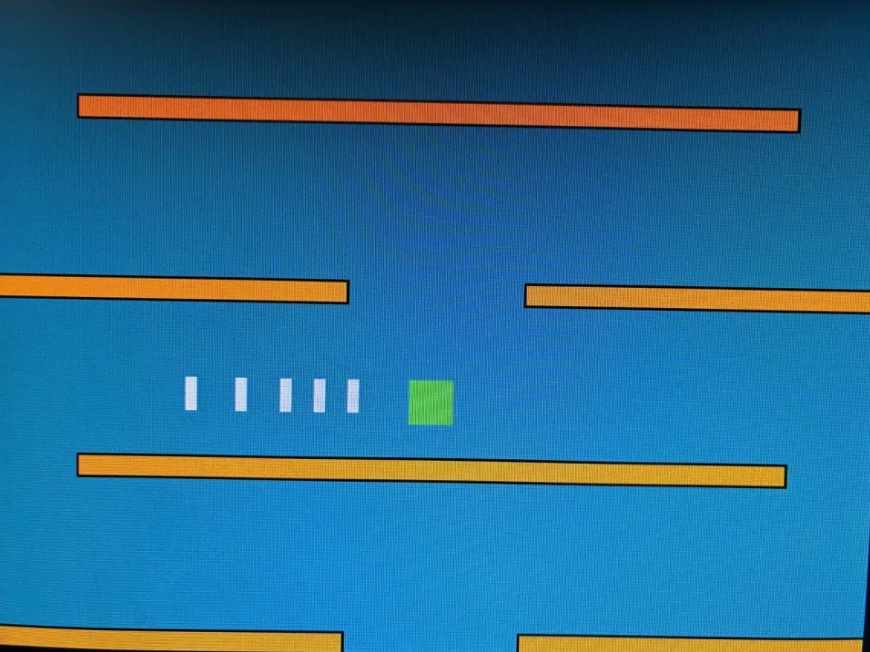
Here is what the game currently looks like (I don’t have screenshotting on my Pi so you get the real life picture)
Prologue
If you don’t care for the personality aspects, skip this section. Writing C++ in a terminal with pretty colors is still hitting my brain funny, making this “mini jam” so much more fun. I did less work yesterday since I didn’t caffeinate efficiently, caffeine appears to be directly correlated with output. I have only had few crisi (is that the plural?) about whether or not I am using my time properly, but then I realized this is recreational C++ - there is no right or wrong answer.
Entities
Going into rendering I knew I would need to treat each object uniquely, I envision a beginning where I will have a player rectangle, that can jump around and move on top of floor rectangles. Because of this, I need to determine which rectangle is the player, handle the players movement, color, and size, so I added an Entity class that I store in a std::vector<unique_ptr<Entity>> Entities which I use to call Update / FixedUpdate / Render on each entity that I am tracking. This list will update as projectiles get spawned / deleted, which I learned about std::erase_if, that lets me pass in a vector, and a predicate lambda to decide if each entity should live. If the predicate returns true, the unique_ptr<Entity> is removed from the vector, it gets deleted and its destructor is called. The predicate is checking if Entity->IsAlive() is false (we don’t delete the Entity during game time, we just call Kill() which makes IsAlive() return false). We do this at the end of the game loop to confirm no interruption happens when we choose to delete an Entity.
main.cpp L324–345 The Entity base class: Kill() just flips IsAlive()
class Entity{public: friend Game; Entity(){} virtual ~Entity(){} bool IsAlive() { return bIsAlive;} void Kill() { bIsAlive = false; } protected: virtual void Update(){} virtual void FixedUpdate(){} virtual void Render(){} bool bIsAlive = true;};
view on GitHub →
main.cpp L529–532 Cleaning up dead entities with std::erase_if
void CheckTrackedEntities() { erase_if(Entities, [](const unique_ptr<Entity>& E){ return !E || !E->IsAlive(); } ); }
view on GitHub →
Great now that we have a way of abstracting objects to treat them as unique individuals in a game environment, let’s move onto Rendering.
Rendering
I will not pretend I have fully grasped / realized how rendering works, but I did make it so rectangles of a size / position / color of my choosing renders. I will also not pretend I discovered the boilerplate required to draw pixels using API from the Linux kernel. There were 2 methods I used, the first one did not work out.
<termios> - Uses ANSI escape characters to draw colored pixels in the linux terminal, the unfortunate part about this is each “pixel” is basically a character in a log line. While this was cool, it seemed to be relatively useless for gameplay code, as we want to update pixels anywhere on the screen at any time, not just new terminal lines. This required some flags to be set in order for the colors to render properly.
<linux/fb.h> - Uses actual pixels on the screen, which can be overridden by new log lines. There is more support for resetting the screen and making sure it doesn’t update with terminal lines while playing the game. This allocates 1 pixel per the size of the screen when the program starts, treating the screen more like a grid which is exactly what we need for gameplay. This required a lot more boilerplate, which I actually used a previous vibe coded project as a reference implementation to setup. After getting a pixel setup I made a DrawRectangle method that I am now using to make sure I am setting up color macros correctly (coding manually is more fun when you do it in a neat, reusable way).
main.cpp L97–101 Global defaults and the GameBuffer: 320 × 240 × 2 bytes = 150 KB
// Global Defaultsstatic const int GameWidth = 320;static const int GameHeight = 240;static const int PixelScale = 2;static uint16_t GameBuffer[GameWidth * GameHeight];
view on GitHub →
main.cpp L112–149 DrawPixel, the color macros, and DrawRectangle
void DrawPixel(int PosX, int PosY, Color16 Color){ if(PosX < 0 || PosX >= GameWidth || PosY < 0 || PosY >= GameHeight) { return; } GameBuffer[PosY * GameWidth + PosX] = Color.Value;}; #define CLEAR_COLOR Color16(0, 128, 128)#define RED Color16(255, 0, 0)#define GREEN Color16(0, 255, 0)#define BLUE Color16(0, 0, 255)#define CYAN Color16(0, 255, 255)#define MAGENTA Color16(255, 0, 255)#define YELLOW Color16(255, 255, 0)#define ORANGE Color16(255, 128, 0)#define WHITE Color16(0, 0, 0)#define BLACK Color16(255, 255, 255) void Clear(Color16 Color){ for(int Y = 0; Y < GameHeight; Y++) { for(int X = 0; X < GameWidth; X++) { DrawPixel(X, Y, Color); } }}void DrawRectangle(int PosX, int PosY, int SizeX, int SizeY, Color16 Color){ for(int Y = PosY; Y < PosY + SizeY; Y++) { for(int X = PosX; X < PosX + SizeX; X++) { DrawPixel(X, Y, Color); } }}
view on GitHub →
Next step is to make each rectangle its own entity and prepare the screen to look like an actual level! Exciting! This is equally as exciting as projects that are completely vibe coded, both methods of development involve getting out what you put in, and bringing a vision to life.
Minor Tooling
To make life easier (and maybe others want to run this for some reason?), I added a Run.sh, Build.sh, and BuildAndRun.sh, since I found myself going further and further into my terminal line history.
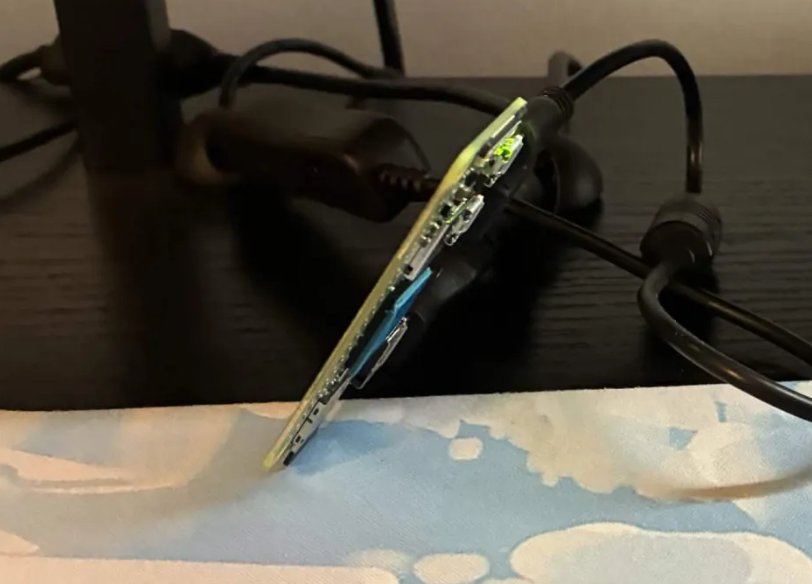
With that in mind, I thought I would end this post in a photo of the $15 computer I’m programming on. I like to think the Raspberry Pi Zero 2 W is sitting at a 67 degree angle.
Like most humans, I woke up with the urge to use Vim on my Raspberry Pi Zero 2 W to code a game purely in a linux terminal using C++. This is the return of Frog Token Worlds (the unfortunate sequel that nobody asked for).
My Setup
I’m using a Raspberry Pi Zero 2 W, which has 512MB of RAM, it’s about the size of a flash drive and cost me $15. I’m using a keyboard and monitor that I got for free. The power cable I got in a kit, individually it’s worth $9 on Amazon.
The total cost of this setup I’m using is <$25, so if you don’t have a setup to write C++, go mow a single lawn at a discounted price and you now have sufficient technology to become a C++ developer.
About Frog Token Worlds
For those interested, Frog Token Worlds is a game I released on itch.io a 2D and 3D version of, I showed it off at a gaming convention that is no longer with us (ECGC 2022), working alongside the 3D artist Logan Thomas (who is known for his work at Funcom). This work was done pre-employment at Epic Games. Post-employment at Epic Games, I started working on an Unreal Engine 5 version of the game that features multiplayer using the Online Multiplayer Subsystem to host / join peer-to-peer multiplayer, using UE’s networking reflection system (this is unreleased).
AI Disclaimer
I am using AI for documentation to see what libraries exist so I can accelerate my knowledge, using a separate device, there is no AI hooked up to my Pi Zero, I am writing the C++ code by hand, byte by byte. I think AI is an amazing tool for productivity and accomplishing things at a speed that was never before possible (I have other projects where I focus on this further). That being said I am using this as an opportunity to learn more about C++ as an excuse to code more and continue learning about C++ practices, which will make me continue to generate and maintain better C++ code using AI. It has never been easier to learn about what boilerplate is required for input / rendering on a linux terminal.
This is not a tutorial
I will not be going over how to setup your Raspberry Pi to develop C++ games in Vim, if you’re interested in this, consult your AI model of choice. Setup for new environments has never been easier in this new era of technology. Also, I am writing this all in a single main.cpp at the moment because I think it may be neat to make this game in 1 file, but will see how much I regret this decision later.
The most satisfying part about all this work is seeing how tiny the computer is, using the default syntax highlighting in Vim (using hit classics such as #FF0000, #FFFF00, #FF00FF, #00FF00, and #00FFFF) and most importantly of all — no language server!
Update / Fixed Update Loop
“Isn’t this just while(true){}?”
Now for the easiest part about developing a game from scratch in C++, the game loop. If you’ve used Unity or Godot, you’re familiar with void Update() and void FixedUpdate(). It’s important to get this right because it will determine how your game looks and feels to the user. Without going too far in the weeds, Update() is used for input and rendering and has a higher cap of FPS, FixedUpdate() is where your physics run on a fixed frame time. The reason I say Update() has a cap, is because by default, Update() will run >1,000,000 / second.
I use the following at the end of the main game loop to control the FPS (300 being my arbitrary FPS cap). This way, I can just call Update() in my main loop.
main.cpp L473–477 The frame cap at the end of the game loop
CheckTrackedEntities(); // Without this, we will run at >1,000,000 FPS this_thread::sleep_until( chrono::steady_clock::now() + FrameTime()); }
view on GitHub →
For FixedUpdate(), every iteration of the main game loop is checking if(CurTime - LastFrameTime >= (1000ms / FixedFPS)). I previously was doing if(CurTime > (LastFrameTime + (1000ms / FixedFPS))), but decided the former was more clean. These are however mathematically identical. To test this, I incremented a variable of FixedFrames in FixedUpdate() and UpdateFrames in Update(), and made the game end after 5000ms (this is how I found out the while loop ran 6,000,000 times in 5 seconds). This proves how important it is to verify fundamental code that runs frequently works, otherwise we could be performing expensive operations faster than the little Raspberry Pi Zero 2 W can handle.
main.cpp L458–478 The game loop: FixedUpdate on a timer, frame cap at the bottom
void GameLoop() { Initialize(); SpawnEntity(); while(bIsActive) { Update(); CheckInput(); Render(); if(chrono::steady_clock::now() - LastFixedFrame >= (1000ms / FixedFPS)) { FixedUpdate(); } CheckTrackedEntities(); // Without this, we will run at >1,000,000 FPS this_thread::sleep_until( chrono::steady_clock::now() + FrameTime()); } }
view on GitHub →
Input
I started using Termios, which is a linux library for input, generally recommended for UI. There was some boiler plate I used and made my own input system (that is basically just a case statement), which made me realize movement with this is a bit janky - if I were to hold down left, then press space, and let go of space, all input would stop. This is bad for gameplay because I want the player to keep moving left after I jump while moving left.
The alternative I learned about is called “evdev” which is another linux input system that is closer to the kernel, and is used for tracking input events concurrently. I was going to get into rendering today but decided I have only enough wind in me to refactor the Termios input system I worked on into using evdev.
This runs in the Update() loop under a CheckInput() method (for code cleanliness even though it’s all in main.cpp now anyways :D )
After adding evdev, I implemented a method following more boilerplate that detects a keyboard (errors if initialization fails). The key difference (HAHA GET IT?!? KEY?!??? LIKE KEYBOARD KEYS?!?) is evdev gives you access to “on release” which allows you to design a smoother method of holding down more than 1 key while playing.
main.cpp L534–558 evdev input: press (value 1) vs. release (value 0)
void CheckInput() { input_event Ev; if(read(FoundKeyboard, &Ev, sizeof(Ev)) == sizeof(Ev)) { if(InputMap.contains(Ev.code)) { switch(InputMap[Ev.code]) { case(InputKey::Jump): if(Ev.value == 1) { Jump(); } break; case(InputKey::Shoot): if(Ev.value == 1) { ShootDown(); } else if(Ev.value == 0) { ShootReleased(); } break;
view on GitHub →
I did not finish implementing the evdev version as I started getting sleepy and I may be getting sick, hopefully not too sick as I want my brain to be at peak performance so I can finish input and move onto rendering on a linux terminal.
^That’s something a quitter would say. Finished implementing evdev so tomorrow all I have to worry about is rendering. Recreational C++ is da bomb. Aight I’m outta here peace chat.